

Google Business Profile Management in Delhi: Local SEO Guide
Introduction
When people search for a nearby shop, clinic, restaurant, salon, or service provider, they often use Google Search and Google Maps to find the right business. If your business profile is incomplete, outdated, or inactive, potential customers may choose a competitor instead.
Google Business Profile management in Delhi helps local businesses maintain accurate information, publish regular updates, respond to customer reviews, and improve their online presence.
NearGrow Ads helps local businesses manage their Google Business Profile with a consistent, practical approach focused on visibility, customer trust, and long-term growth.
What Is Google Business Profile Management?
Google Business Profile management involves keeping your business information accurate and useful on Google Search and Google Maps.
It includes updating business hours, adding photos, publishing posts, responding to reviews, checking business categories, and monitoring relevant local search keywords.
For example, a cafe in Janakpuri should display its correct address, opening hours, menu information, contact details, and recent photos. This helps potential customers make informed decisions before visiting.
Why Is Google Business Profile Management Important for Businesses in Delhi?
Delhi has a competitive local market. Customers frequently compare nearby businesses before choosing where to shop, eat, or book a service.
A well-maintained Google Business Profile can help businesses:
- Make important contact details easy to find.
- Give customers useful information before they visit.
- Showcase products, services, offers, and business photos.
- Build trust through genuine customer reviews and professional responses.
- Monitor profile interactions and identify opportunities for improvement.
For example, a salon in Dwarka can publish updates about its services, maintain accurate opening hours, and respond professionally to reviews. A clinic in Janakpuri can keep its contact information and appointment details up to date.
Profile management does not guarantee a particular Google ranking or a fixed number of enquiries, but it helps establish a more reliable local presence.
Step-by-Step Guide to Google Business Profile Management in Delhi
Step 1: Complete Your Business Information
Check your business name, address, phone number, website, opening hours, and business category. Ensure that the information is accurate and consistent.
Only use a genuine business address that follows Google's eligibility guidelines.
Step 2: Choose the Right Business Categories
Select the most relevant primary category and appropriate additional categories. Categories should accurately describe your business rather than simply target popular keywords.
For example, a dental clinic should choose a category that describes its actual healthcare services.
Step 3: Add High-Quality Business Photos
Upload genuine, clear photographs of your storefront, interior, team, products, and services where relevant.
A restaurant in South Delhi might showcase its dining area and popular dishes, while a retail shop could feature its products and store entrance.
Update photos periodically and avoid misleading or heavily edited images.
Step 4: Publish Regular Google Business Profile Posts
Use posts to share useful business updates, offers, events, new services, and announcements.
Write clear descriptions and include a relevant call to action when appropriate. Keep information current and make sure any offer includes accurate terms and dates.
Step 5: Respond to Customer Reviews
Thank customers for positive feedback and address negative reviews calmly and professionally.
Avoid sharing private customer information. Never purchase fake reviews or offer incentives in exchange for positive reviews.
You can also invite genuine customers to leave honest feedback without pressuring them.
Step 6: Monitor Local Keywords
Identify search phrases relevant to your business and service area, such as "salon in Dwarka" or "cafe in Janakpuri."
Check how your profile performs for relevant searches and use the findings to improve your business information and website content. Do not add unnatural keyword repetitions to your business name.
Step 7: Review Performance Every Month
Review available profile performance data, including search visibility and customer interactions where reported.
Look for useful patterns, such as increases in calls, website clicks, direction requests, or other available actions. Compare performance over time instead of judging results from a single day.
Common Google Business Profile Mistakes to Avoid
- Leaving business hours or contact details outdated.
- Choosing irrelevant business categories.
- Uploading low-quality or misleading photos.
- Ignoring customer reviews.
- Using fake reviews or prohibited incentives.
- Stuffing keywords into the business name.
- Creating duplicate profiles for the same location.
- Expecting immediate ranking improvements.
- Making unsupported claims about guaranteed leads or rankings.
Avoiding these mistakes helps maintain a more trustworthy business profile.
Pro Tips for Better Local SEO in Delhi
Keep Your Business Information Consistent
Make sure your website, business profile, and other important online listings show accurate business details.
Create Helpful Local Content
Answer common customer questions and explain your actual services. Mention service areas naturally where relevant instead of repeating city names unnecessarily.
Focus on Real Customer Experience
Clear directions, accurate hours, useful photos, helpful service information, and professional review responses all make it easier for customers to choose your business.
Follow Google's Guidelines
Use genuine business details, authentic customer reviews, and eligible locations. Local search visibility depends on several factors, including relevance, distance, and prominence.
Conclusion
Google Business Profile management is an important part of building a reliable local presence. Accurate business information, genuine photos, useful updates, professional review responses, and regular performance checks can help customers understand and find your business.
For local businesses in Delhi, a consistent approach is more useful than occasional updates or shortcuts that violate Google's guidelines.
Grow Your Local Presence with NearGrow Ads
Want help keeping your Google Business Profile active and professionally managed?
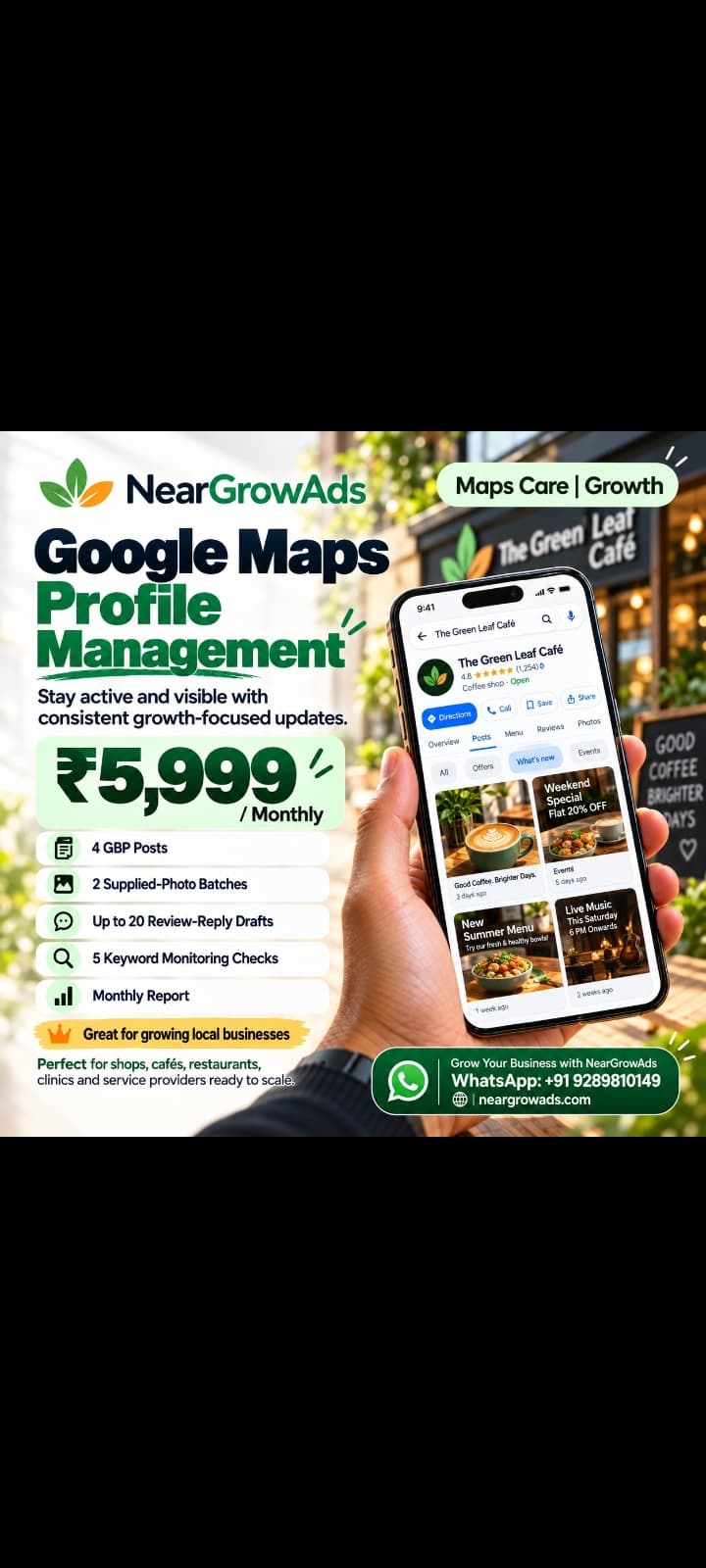
NearGrow Ads supports local shops, restaurants, cafes, salons, clinics, and service providers with regular profile posts, customer review-reply drafts, local keyword monitoring, and monthly reporting.
Google Maps Care Growth Plan: ₹5,999 per month for one business location.
Contact NearGrow Ads to discuss your business needs.
Website: https://neargrowads.com/
WhatsApp: +91 9289810149
NearGrow Ads — Grow Local. Get More Customers.